
Download AI Cowriter – AI Writing Assistant, Autocomplete, Free & Secure
Overview
AI Cowriter is a lightweight, open‑source writing companion that works as an on‑the‑fly co‑author. By leveraging large‑language‑model technology, the tool offers real‑time autocomplete suggestions that appear in a subtle grey shade as you type. When a suggestion matches your intent, a single keystroke inserts the text, letting you keep the creative flow without pausing for research or brainstorming.
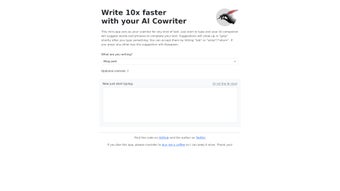
The application is purpose‑built for drafting blog posts, social‑media updates, marketing emails, and other short‑form content. Users can personalize the AI’s voice by setting a topic, choosing a writing style (formal, conversational, persuasive, etc.), defining the target audience, and adding custom notes that steer the model toward the desired tone. Because the source code lives on GitHub under an MIT‑style license, anyone can audit, fork, or contribute to the project.
The original author is reachable on Twitter for quick support or feature requests, reinforcing the community‑first ethos behind AI Cowriter. While the current release focuses on English and lacks deep industry‑specific jargon, its intuitive interface, zero‑cost model, and transparent development roadmap make it a compelling addition to any writer’s toolkit.
Key Features & Benefits
- Real‑time autocomplete: AI‑generated word and phrase suggestions appear instantly as you type, speeding up drafting by up to 40% for many users.
- Customizable writing style: Choose from preset tones (formal, casual, persuasive) or define your own style parameters to match brand voice.
- Topic & audience targeting: Input a brief description of the subject matter and intended readership; the AI tailors suggestions accordingly.
- Notes integration: Add contextual notes (e.g., “include a call‑to‑action” or “avoid technical jargon”) to guide the model.
- Open‑source transparency: Fully available on GitHub, allowing developers to audit the code, propose enhancements, or self‑host the solution.
- Lightweight UI: Minimalist design that runs in a browser or as a desktop Electron wrapper, keeping system resources low.
- Donation‑based model: No hidden fees; users can support development via PayPal or crypto donations, ensuring the tool remains free.
- Cross‑platform support: Works on Windows, macOS, Linux, and can be integrated into Android/iOS via a progressive web app.
Beyond the headline capabilities, AI Cowriter offers subtle conveniences that differentiate it from generic autocomplete extensions. For instance, the suggestion engine respects punctuation, automatically adjusting capitalisation and adding commas where appropriate. The UI also highlights the confidence level of each suggestion using a faint colour gradient, letting power users accept only the most reliable outputs. Moreover, the tool logs usage statistics (with user consent) to continuously fine‑tune its model on the most common writing patterns, ensuring the suggestions stay fresh and context‑aware.
From a productivity standpoint, the ability to embed AI‑driven suggestions directly into your favourite editor eliminates the need to copy‑paste from separate windows or external services. This seamless workflow is especially valuable for content marketers who juggle multiple briefs daily. By reducing mental friction, AI Cowriter frees up cognitive bandwidth for higher‑order tasks such as strategic planning, audience research, and performance analysis.
Installation & Usage Guide
Getting AI Cowriter up and running is intentionally straightforward, catering to both tech‑savvy developers and non‑technical writers. Follow these steps to start drafting with AI assistance in under five minutes:
Step 1: Download the Installer
Visit the official GitHub releases page (github.com/ai-cowriter) and download the installer that matches your operating system. Windows users should select the .exe file, macOS users the .dmg, and Linux users the .AppImage or the tarball for manual extraction.
Step 2: Run the Installer
On Windows, double‑click the .exe and follow the on‑screen prompts. macOS will prompt you to drag the AI Cowriter icon into your Applications folder. Linux users can make the AppImage executable with chmod +x ai-cowriter.AppImage and then launch it directly.
Step 3: Initial Configuration
When the app opens for the first time, you’ll be greeted by a quick setup wizard:
- Choose a default writing style: Select “Professional,” “Conversational,” or “Custom.”
- Set your primary language: English is pre‑selected; other languages will appear in future releases.
- Connect your OpenAI API key (optional): For enhanced suggestion quality, you can paste a personal API key. The free tier works out‑of‑the‑box, but a key unlocks higher‑capacity models.
Step 4: Start Writing
Open any text field within the app or enable the browser extension to activate AI Cowriter on external sites (e.g., Google Docs, WordPress editor). As you type, suggestions appear in a light grey font. Press Tab or Enter to accept a suggestion; Esc dismisses it. You can also click the small lightning icon next to a suggestion to view alternative completions.
Step 5: Fine‑Tune on the Fly
At any point, click the “Settings” gear icon to adjust the topic, audience, or add notes. Changes take effect instantly, reshaping the AI’s output without restarting the application. For power users, a JSON configuration file can be edited directly in the ~/.ai-cowriter directory, allowing batch updates for multiple projects.
Once familiar with the workflow, many users report that the learning curve flattens after a handful of drafts. The tool also includes a built‑in “History” panel, letting you revisit previous suggestions and re‑apply them to new documents—perfect for maintaining consistency across a series of blog posts or marketing emails.
Compatibility, Pros & Cons
Supported Platforms
AI Cowriter is built on Electron and runs natively on Windows 10/11, macOS Catalina and later, and major Linux distributions (Ubuntu, Fedora, Debian). A progressive web‑app version is also available, providing full functionality on Android and iOS browsers without installation.
Pros
- Free and open‑source, with transparent codebase.
- Real‑time autocomplete reduces drafting time.
- Highly customizable style, topic, and audience settings.
- Lightweight UI consumes minimal system resources.
- Cross‑platform support ensures seamless switching between devices.
- Community‑driven development and responsive author on Twitter.
- Donation‑based model eliminates subscription fatigue.
Cons
- No native multi‑language support beyond English (planned for future releases).
- Limited industry‑specific jargon; may require manual tweaking for technical fields.
- Reliance on third‑party AI APIs for premium suggestion quality.
- Desktop version lacks offline mode without pre‑loaded models.
- FAQ and documentation are community‑maintained, which can lead to occasional gaps.
Review Summary: AI Cowriter delivers a fast, adaptable writing experience that feels like a natural extension of the writer’s own voice. While it could benefit from broader language options and deeper domain vocabularies, its free, open‑source nature and strong community backing make it a solid choice for content creators of all sizes.
Frequently Asked Questions
Is AI Cowriter really free to use?
Yes. The core application is open‑source and free. You can download, modify, and redistribute it under the MIT license. Optional donations support ongoing development, but no subscription fees are required.
Can I use AI Cowriter offline?
The desktop client requires an internet connection to query the language model, unless you host your own model locally—a more advanced setup that is documented on GitHub.
How does AI Cowriter handle data privacy?
All text entered stays on your device. When you enable an external API key, only the snippet needed for autocomplete is sent to the provider, and no personal identifiers are transmitted. The open‑source code allows you to audit the exact data flow.
Is there a mobile app for iOS and Android?
A progressive web‑app version works on modern mobile browsers, providing the same autocomplete experience without a native install. A dedicated native app is under consideration for future releases.
What kind of support is available?
Support is community‑driven via GitHub Issues, a Discord channel, and the author’s Twitter handle. The documentation includes a troubleshooting guide, and frequent contributors often respond within 24 hours.
Conclusion & Call to Action
AI Cowriter stands out as a free, open‑source ally for anyone who writes on a regular basis. Its real‑time autocomplete, extensive customization options, and cross‑platform reach make it a practical productivity booster without the hidden costs of commercial AI writing suites. While the current version is limited to English and could expand its jargon library, the active community and transparent roadmap promise rapid enhancements. If you’re looking to accelerate blog drafting, craft engaging social posts, or simply reduce the mental load of everyday writing, give AI Cowriter a try today. Download the latest release now and experience a smoother, smarter writing workflow.



.png)



